CodeGuard by GRCxAI · Early access

Code security that tells you what it did not check.

CodeGuard scans your repositories for security weaknesses, has the AI model you choose check each result against the code, and reports what it could not check as plainly as what it found.

A separate product from the GRCxAI platform, with its own sign-in and its own billing. We set up your organisation and invite its first owner.

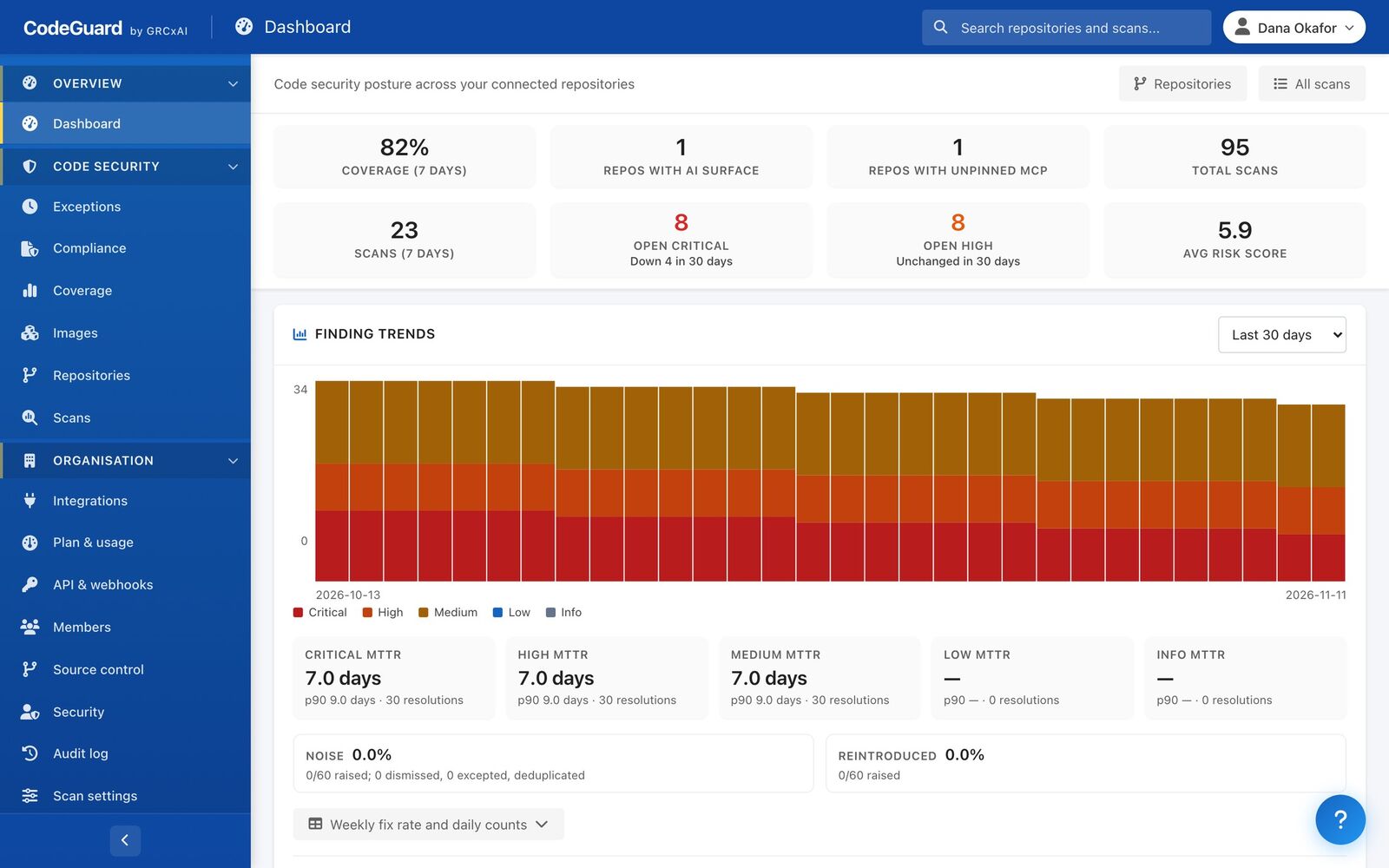
CodeGuard dashboard showing scan coverage, open critical and high findings, and a 30-day finding trend
The real application, on invented sample data.
14
Languages with code rules
400+
Code rules
7
Frameworks with evidence packs
1–5 min
A typical standard scan
How a scan runs

Your code is read. It is never built and never run.

CodeGuard takes a shallow copy of the repository, runs its scanners, then asks a model to judge the results against the code. The copy is deleted when the scan ends.

  • A one-hour access token, never stored. The repository is cloned over HTTPS with Git hooks disabled.
  • Scanners first, with no model involved: secrets, dependencies and their advisories, code rules, infrastructure and pipeline files, AI components and Postgres row-level security.
  • Then the AI stages, on the model you pick and your own API keys: a whole-repository review, an AI report and an optional Deep Audit.
  • One risk score per finding, raised by known exploitation (CISA KEV) and exploit likelihood (EPSS).
  • A software bill of materials in CycloneDX and SPDX, with VEX statements.
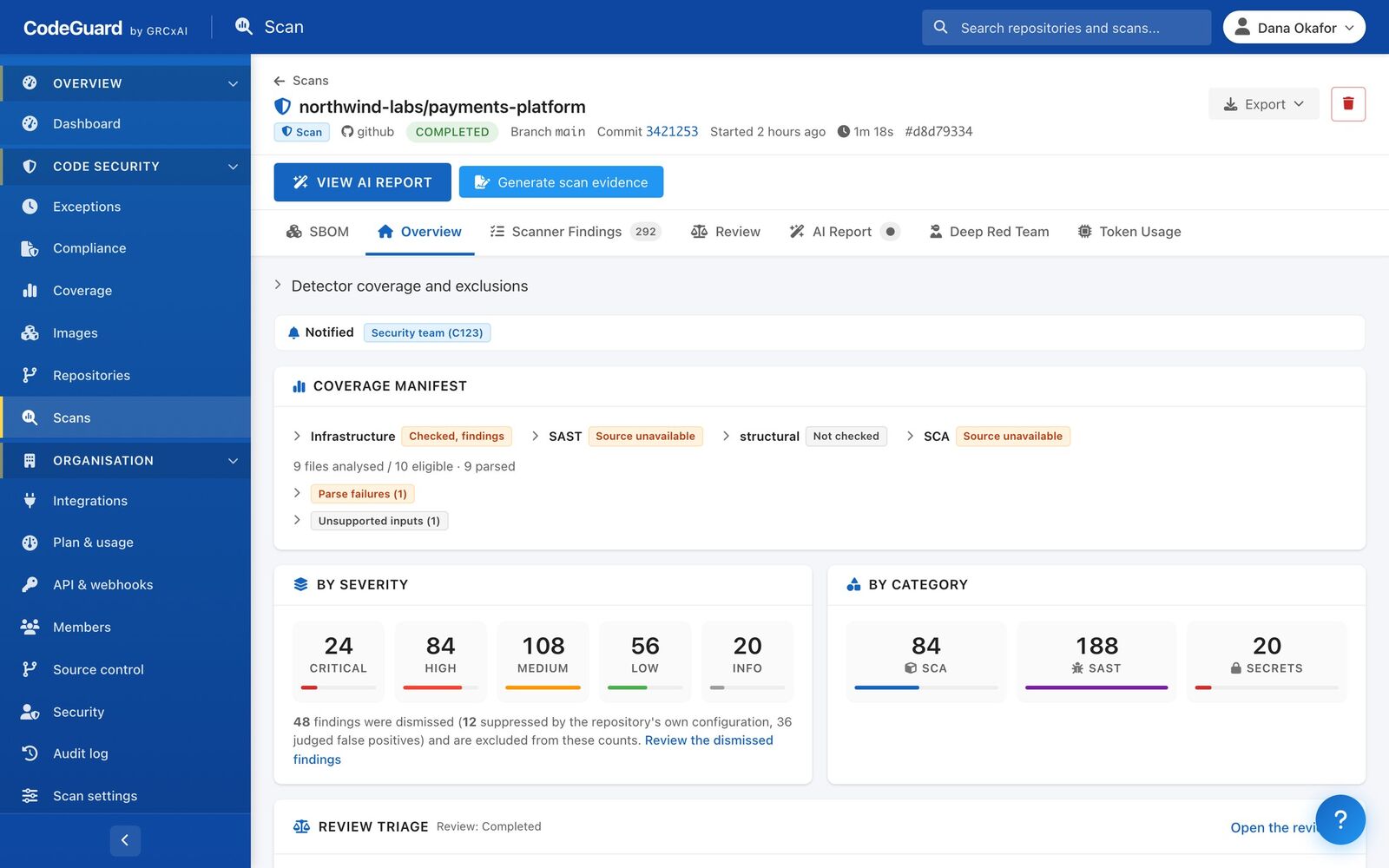
A completed CodeGuard scan: coverage manifest, findings by severity and by category
The real application, on invented sample data.
Completeness

A clean scan is not proof. So every scan says what it covered.

Most scanners report what they found and stay silent about what they could not read. CodeGuard’s Completeness view lists what ran in full, in part or not at all.

  • Unchecked is never reported as clean. A stage that was switched off or timed out shows as Not checked.
  • Degraded scans are labelled as degraded, when some stages did not run or could not read their input.
  • Owners come from each repository’s CODEOWNERS file, so a finding has somewhere to go.
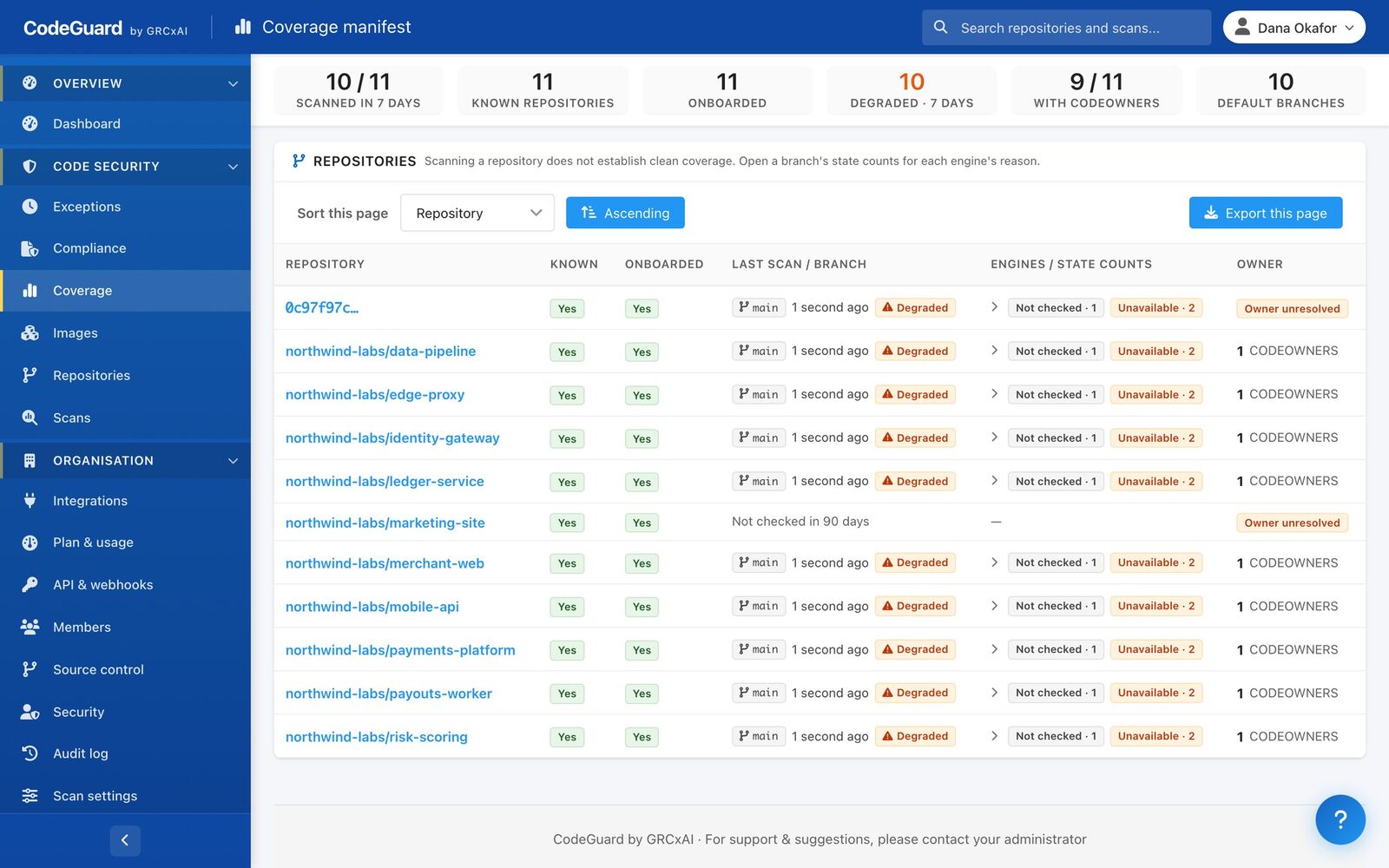
CodeGuard coverage manifest listing each repository with its last scan, degraded state and engine state counts
The real application, on invented sample data.
Findings you can check

Every AI verdict quotes the lines it relied on.

A finding records its severity, file and line, the evidence excerpt, the CVE or CWE, the fix version and whether your code reaches the vulnerable function. The AI review then gives a verdict, with quotations that are matched back against the code.

  • A quote that cannot be matched to the code leaves the finding open. It is not accepted on the model’s say-so.
  • The score is explained, factor by factor, on the finding itself.
  • Exceptions carry an expiry and a second approver. Nobody approves their own request.
  • Delivered where your team works: Jira Cloud and Microsoft Teams are live today.
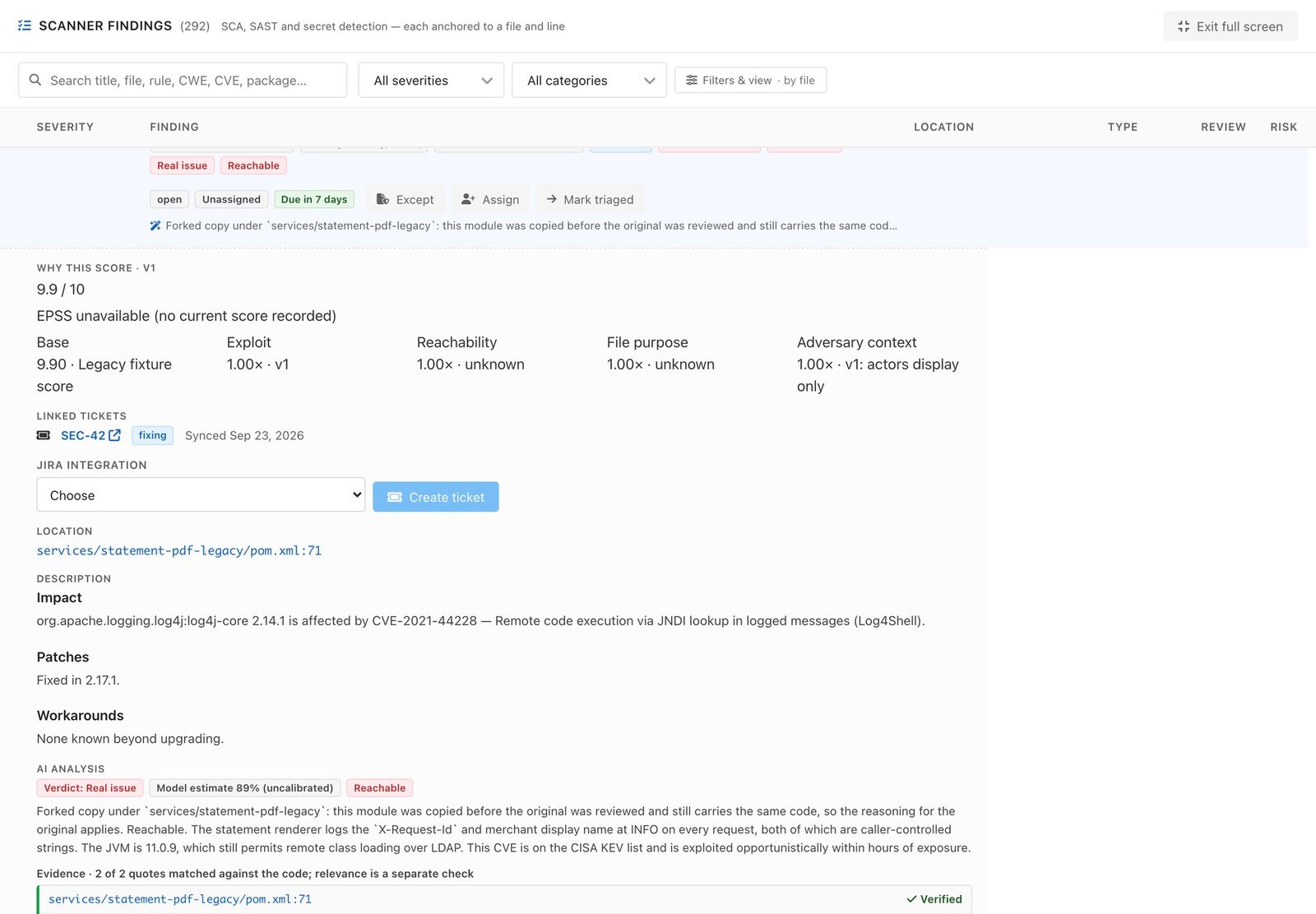
An open CodeGuard finding showing its score breakdown, location, patch version and AI analysis with verified evidence quotes
The real application, on invented sample data.
What it checks

One scan, 12 kinds of evidence.

All of these are live in production today.

Code rules (SAST)

400+ rules across 14 languages, with no AI model involved.

Dependencies

14 ecosystems read from lockfiles and manifests, from npm and PyPI to Conan and git submodules, checked against published advisories.

Malicious packages

Always on. A known-malicious package is raised as critical, and stored inventories are re-checked daily as new advisories appear.

Secrets

Credentials in the files on the scanned commit, with optional live validity checks that you switch on.

Infrastructure and pipelines

Terraform, Kubernetes, Helm, Dockerfile, Compose, GitHub Actions and GitLab CI.

AI components

LLM, agent and MCP code checked against the OWASP Top 10 for LLM Applications, 2026 edition.

Postgres row-level security

For repositories with Postgres migrations: the final schema is replayed and its row-level security posture judged.

Container images

Images scanned by reference from GitHub Container Registry, Docker Hub, GitLab Container Registry and Amazon ECR, including distroless and multi-platform images. Red Hat images include the vulnerabilities Red Hat has not fixed yet, from its own VEX data, and the distribution’s own severity rating is used ahead of CVSS.

Whole-repository AI review

The model you choose reads the repository and judges each finding against the code, quoting what it relied on.

Deep Audits

The scanners run first; then the model reviews the whole repository for weaknesses and how to fix each one. Typically 10 to 60 minutes.

Licence policy

Your licence policy applied across the dependency inventory.

Software bill of materials

CycloneDX and SPDX exports of what the scan found in the repository, with VEX statements.

After the scan

Evidence an auditor can follow.

Findings are only useful if something happens to them. CodeGuard carries each one through policy, exceptions and release gates, and assembles what an auditor asks for.

  • Fixed means fixed: a finding closes only when a rescan no longer finds it, and the gate, VEX statements and Jira follow.
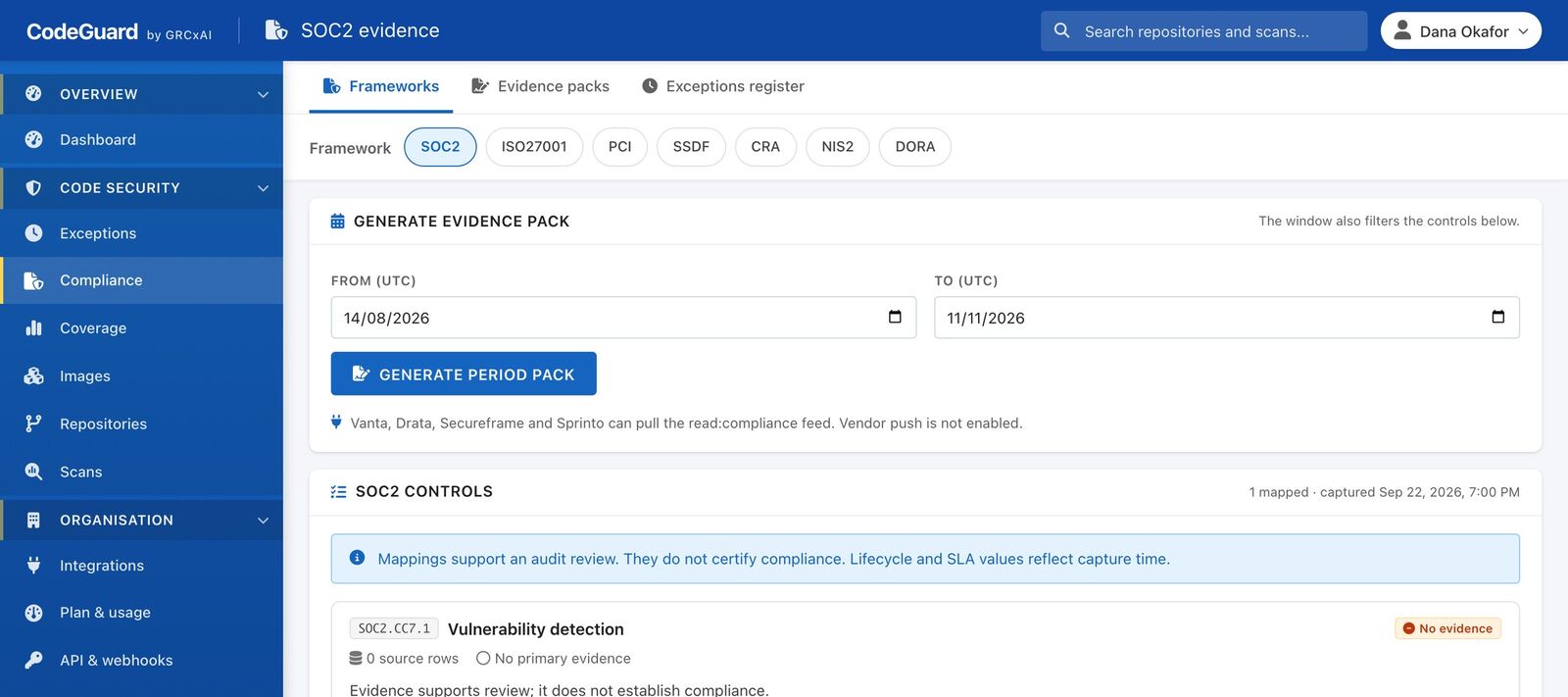
  • Evidence packs for 7 frameworks: SOC 2, ISO 27001, PCI, SSDF, CRA, NIS2 and DORA.
  • Policy: what blocks, what warns, and how long each severity has to be fixed.
  • Pull-request scans with a merge gate, on GitHub and GitLab, and release gates.
  • Fix pull requests, checked by your own CI. A proposed fix is offered only after your own CI passes on it. It is never built on our servers, and a person still reviews and merges it. Autofix is off until your organisation switches it on.
  • An append-only audit log of who decided what.
CodeGuard compliance view generating an evidence pack, with a tab for each supported framework
The real application, on invented sample data.
How the Deep Audit works

Find everything first. Then prove each one.

A single quick read of a repository stops early and misses whole classes of weakness. The desktop Deep Audit now works in two steps, with the model you choose.

1. Find

  • The model reads every route, view, template and settings file, and lists anything that could be a weakness, including on admin and developer pages.
  • Large repositories are split into parts, so each part gets a full read.
  • Repeated candidates are merged before anything is checked.

2. Judge

  • Each candidate is checked against the code by a separate pass, which confirms it, rejects it or marks it suspected.
  • Confirmed findings are written up with the lines they rely on, and a quote that is not in the file is dropped.
  • Suspected findings are shown apart and never counted as findings.

What it changed

  • On 10 public benchmark applications with 311 known flaws (RealVuln), the audit found about three in four, up from about half with a single pass on the same model. Five of the applications were never looked at while the method was built.
  • Run twice on the same applications, it found almost exactly the same flaws: 116, then 115.
  • It also reports problems the benchmark does not list. Two other models, checking a sample blind, judged 59 of 60 of those to be real; some are minor hardening rather than urgent fixes.
  • It takes longer and uses more of the developer’s AI plan than a single pass.
Desktop app

Run it on your own machine, with your own AI.

Every signed-in member can download the CodeGuard desktop app for Windows 10 or 11, 64-bit and macOS on Apple silicon. It downloads from inside CodeGuard and updates itself.

On the machine

  • The scanners run offline: code rules, secrets and structural rules.
  • The Deep Audit runs on the developer’s own Claude Code or Codex, reading a copy of the project and never changing it.
  • Fix selected: tick several findings, or fix all High findings or a whole file, and the same agent fixes them in one visible session, most severe first. Each change can be kept or undone on its own, the whole batch can be undone or reopened, and a recheck of the kept fixes shows which findings are gone.
  • In VS Code: CodeGuard by GRCxAI, free on the Visual Studio Marketplace for macOS on Apple silicon and 64-bit Windows, runs Deep Audits with the developer’s own Claude Code or Codex, linked to your CodeGuard organisation, and puts its findings in VS Code’s Problems panel. A fix runs in a focused terminal for you to review, keep or undo, and a recheck says whether the finding is fixed. Fix selected works here too: tick several findings, or fix all High findings or a whole file, and the agent fixes them in one visible session, most severe first. Each change can be kept or undone on its own, the whole batch can be undone or reopened, and a recheck of the kept fixes shows which findings are gone.

Who pays for the AI

  • Developers’ own Claude Code or Codex, in the desktop app: paid by the developer’s subscription.
  • The desktop app on a developer’s own API key: paid by the developer’s provider account.
  • The desktop app on your Microsoft Foundry: paid by your Azure subscription.
  • The desktop app on a key you assign each developer: paid by your provider account.
  • Owners and admins choose which of these are allowed, and can limit each person.

What reaches CodeGuard

  • The results of a project linked to CodeGuard, so the browser and the desktop app show the same scans. A project that is not linked sends nothing.
  • An admin can set the organisation to keep desktop results on each machine instead.
  • An upload is signed by the machine and can leave out the quoted code. Whole files are never sent, and a secret’s line never is.
Feature matrix

Everything CodeGuard does.

Each row was checked against the product.

CapabilityAvailable todayUses an AI model
Scanners — no AI model involved
Secret scanningFiles on the scanned commit. Optional live validity checks.YesNo
Dependency advisories14 ecosystems: npm, PyPI, Maven, NuGet, crates.io, Go, RubyGems, Packagist, Gradle lockfiles, Swift Package Manager, CocoaPods, Conan, vcpkg and git submodules.YesNo
Malicious-package detectionAlways on; raised as critical.YesNo
Daily re-check of stored inventoriesNew advisories are matched against what earlier scans found.YesNo
Code rules (SAST)14 languages, 400+ rules.YesNo
Infrastructure and CI/CD checksTerraform, Kubernetes, Helm, Dockerfile, Compose, GitHub Actions, GitLab CI.YesNo
AI-surface checksOWASP Top 10 for LLM Applications, 2026 edition.YesNo
Postgres schema and row-level securityRepositories with Postgres migrations.YesNo
Container image scanningGitHub Container Registry, Docker Hub, GitLab Container Registry and Amazon ECR. Distroless and multi-platform images; Red Hat’s unfixed vulnerabilities from its VEX data; the distribution’s severity ahead of CVSS.YesNo
Licence policyYesNo
AI analysis — on the model you choose
Whole-repository AI reviewVerdicts with quoted evidence, matched back against the code.YesYes
AI reportWriting the report uses the model. Exporting it as HTML, Markdown, JSON or SARIF does not.YesYes
Deep AuditRuns the scanners first, then an in-depth review of the code. Charged at least £15.YesYes
Desktop app — Windows 10 or 11, 64-bit and macOS on Apple silicon
Scanners on the developer’s machineCode rules, secrets and structural rules, offline. Nothing leaves the machine.YesNo
Deep Audit on the developer’s own AIClaude Code or Codex on the developer’s own sign-in, or on a key or Microsoft Foundry your organisation provides. Finds, then judges each candidate; a single pass is the quicker option.YesYes
Fix selected, with the developer’s agentTick several findings, or fix all High findings or a whole file, in one visible session, most severe first. Keep or undo each change, undo or reopen the whole batch, then recheck the kept fixes.YesYes
Results in CodeGuardA linked project’s results are uploaded, signed by the machine, and appear beside the cloud scans. An admin can keep them on each machine instead.YesNo
Start and follow cloud scansYesNo
In VS Code: CodeGuard by GRCxAIFree on the Visual Studio Marketplace. Deep Audits on the developer’s own AI, with findings in the Problems panel. Fix selected: tick several findings, or fix all High findings or a whole file, in one visible session, most severe first. Keep or undo each change, undo or reopen the whole batch, then recheck the kept fixes.YesYes
Results and evidence
Risk score per findingSeverity, known exploitation (CISA KEV), exploit likelihood (EPSS) and reachability.YesNo
Completeness viewWhat ran in full, in part or not at all. Unchecked code is never reported as clean.YesNo
Fixed only when a rescan confirms itA finding closes as fixed when a later scan no longer finds it. The merge gate, VEX statements and Jira issue follow automatically.YesNo
MITRE CWE on every findingThe full CWE catalogue, version 5.0: 984 weaknesses.YesNo
One Projects pageRepositories and container images in one list, filtered by criticality, environment, lifecycle and tags.YesNo
One view across web, Mac and WindowsThe same scans, in the same order, in the browser and the desktop app, each showing where it ran.YesNo
Software bill of materialsCycloneDX 1.7 and SPDX 3.0.1, with VEX.YesNo
Evidence packs for 7 frameworksSOC 2, ISO 27001, PCI, SSDF, CRA, NIS2 and DORA.YesNo
Governance
PolicyWhat blocks, warns or passes, and fix deadlines by severity.YesNo
ExceptionsWith an expiry and a second approver. Nobody approves their own request.YesNo
Audit logAppend-only.YesNo
Token usage viewThe cost of every model call.YesNo
AI sourcesOwners and admins choose which of six ways the AI may run, and can limit each person.YesNo
SAML 2.0 and OpenID Connect sign-inSet up by your own admins. Password with an authenticator app is the default.YesNo
Workflow and integrations
GitHub App and GitLab connectionGitLab.com, or a self-managed instance reachable over HTTPS.YesNo
Azure DevOps repositoriesConnect with your own Entra app registration, scan, pull-request status and inline comments, fix and upgrade PRs.YesNo
Scan a public repository by URLNo connection needed, so a new organisation can try it first.YesNo
Pull-request scans and merge gateOn by default for a new organisation, once the GitHub App is installed or GitLab is connected. An admin can switch pull-request scans off in Scan settings. On Azure DevOps, pull-request scans start once you add the service hook described in the setup steps. The gate uses no model; the scan’s AI stages do when they are switched on.YesGate: no
Release gatesYesNo
Draft fix pull requestsOff by default. A proposed fix is offered only after your own CI passes on it; it is never built on our servers, and a person still reviews and merges it.OptionalYes
Dependency-upgrade pull requestsOff by default. npm, PyPI, Go, crates.io and Maven.OptionalNo
Base-image recommendations, and a pull request for the FROM lineRecommendations on every image scan. The pull request is off by default.OptionalNo
Findings in GitHub’s Security tabA SARIF export with rule severities that GitHub code scanning ranks. A CodeGuard GitHub Action is published.YesNo
Jira Cloud and Microsoft Teams deliveryTeams through Teams Workflows.YesNo
REST API with tokensYesNo

Checked on 22 November 2026. “Optional” means off until one of your admins switches it on.

14 languages, and what each one gets

Code rules and dependency checks run with no model involved. The AI review and Deep Audit read every language listed.

LanguageCode rulesDependencies checked fromAI review and Deep Audit
PythonYesPyPIYes
TypeScriptYesnpmYes
JavaScriptYesnpmYes
JavaYesMavenYes
ScalaYesMavenYes
GoYesGo modulesYes
C#YesNuGetYes
RustYes — axum, actix-web, Rocket and warpcrates.ioYes
CYes — unsafe functions, string and off-by-one errors, command injectionConan, vcpkg and git submodulesYes
C++Yes — as CConan, vcpkg and git submodulesYes
PHPYes — plain PHP, Laravel, WordPress, Symfony and CodeIgniterPackagistYes
RubyYes — Rails, Sinatra, Grape and RackRubyGemsYes
KotlinYes — Android, Spring and KtorGradle lockfileRead as text
SwiftYes — iOS apps and VaporSwift Package Manager and CocoaPodsRead as text

CodeGuard ships only rules it may use in a paid service.

Pricing

A platform fee. The AI runs on your own keys.

In pounds sterling, by card through Stripe. The scanners cost nothing per scan. Your AI provider bills you for the model directly.

Platform fee
£500/month

Per organisation — a flat fee, not a price per developer.

  • The platform, and unlimited scanning with the scanners.
  • First month free, from when your first card is added.
  • The fee starts only when we confirm it to you in writing; nothing is charged for it until then.
AI on your own keys
£15 minimum per Deep Audit

Cloud scans use your organisation’s Anthropic or OpenAI keys, or your Microsoft Foundry. CodeGuard adds nothing per token.

  • Six models to choose from: GPT-6.1 Terra (the default), GPT-6.2 Sol, GPT-6.2 Astra, Claude Sonnet 5.5, Claude Opus 5.5 and Claude Fable 5.2.
  • A Deep Audit is charged at least £15, from prepaid credit: top-ups of £50 to £5,000. Every organisation starts at zero.
  • Developers’ desktop audits run on their own Claude Code or Codex subscription, or on keys you provide.
  • CodeGuard’s own keys, paid from credit, are available by agreement. The Token Usage view shows the cost of every model call.
  • Credit lasts 12 months and is not refundable. There is no automatic top-up. No VAT is added.

Legal: CodeGuard Terms of Service · DPA · Subprocessors. CodeGuard is offered worldwide to businesses; the DPA covers UK, EU, Swiss and US state privacy law.

Your code

Where your code goes, exactly.

This is the question a security team asks first, so it is answered here rather than in a sales call.

Where it runs

  • The application, its database and the scanning engines run on GRCxAI’s own production server in a data centre in Germany.
  • Browsers reach it through Cloudflare. The server accepts no inbound connections of its own.
  • Organisations are kept apart by row-level security in the database.
  • The scan process is unprivileged and has a read-only filesystem.

What is kept

  • Findings, with the source excerpts that evidence them.
  • Review text, reports and the dependency inventory.
  • All of it until you delete the scan.
  • The repository itself is not kept.

What a model provider sees

  • The AI stages send the code under review to the provider of the model you chose, with detected secrets redacted: OpenAI for GPT-6.1 Terra, GPT-6.2 Sol and GPT-6.2 Astra; Anthropic for Claude Sonnet 5.5, Claude Opus 5.5 and Claude Fable 5.2.
  • Cloud scans use your organisation’s own account with that provider, so its terms with you apply. CodeGuard’s own keys, where agreed, use the provider’s standard API with no zero-retention or regional arrangement, so that processing can happen outside the UK and the EEA.
  • The desktop app sends code only to the developer’s own Claude Code, Codex or Foundry, never through CodeGuard.
  • A scan with AI analysis switched off sends no code to any model provider.

What else leaves the server

  • Package names and versions, to public advisory databases.
  • For git submodules, a commit id only, so a private submodule’s name stays on our server.
  • If you switch on live validity checks, one read-only call per supported secret to the provider that issued it.

The contract

CodeGuard questions

CodeGuard is in early access. We create your organisation and invite its first owner by e-mail; everyone else joins by invitation from one of your admins. An invitation is accepted in one click, and a public repository can be scanned by its URL before you connect GitHub, GitLab or Azure DevOps.

Book a walkthrough and we will set you up from there.

No. CodeGuard is a separate product with its own sign-in, its own database and its own billing. It does not require a GRCxAI subscription. CodeGuard is sold on its own, and can also be added to a GRCxAI agreement by Order Form.

CodeGuard’s own: the Terms of Service, the Data Processing Agreement and the subprocessor list. They are accepted when you join, and existing users accept them once at their next sign-in. If your organisation has signed an Order Form that expressly includes CodeGuard under the GRCxAI Master Subscription Agreement, that agreement applies instead.

GitHub, through a GitHub App that you install on the repositories you choose, and GitLab — GitLab.com, or a self-managed instance that is reachable over HTTPS. Azure DevOps repositories: connect with your own Entra app registration, scan, pull-request status and inline comments, fix and upgrade PRs.

Yes. Switch AI analysis off and a scan runs the scanners only: no code is sent to a model provider and nothing is charged. You lose the AI review, the AI report and Deep Audits. The desktop app’s scanners also run with no AI at all.

Yes. The desktop app for Windows 10 or 11, 64-bit and macOS on Apple silicon runs the scanners offline and the Deep Audit on the developer’s own Claude Code or Codex. A linked project’s results appear in CodeGuard beside the cloud scans, unless an admin keeps desktop results on each machine.

A standard scan usually takes one to five minutes, plus the report. A Deep Audit typically takes ten to sixty minutes. These are typical figures, not guarantees, and the review of a large repository takes longer.

It means the checks that ran found nothing, and the Completeness view shows exactly which checks those were. Every AI verdict carries the lines of code it relied on, so someone who knows the code can confirm it before acting.

What this page is based on

Every figure on this page was checked against the product on . CodeGuard changes most weeks; the application itself is the authority, and it shows current prices before anything is charged.

  • CodeGuard in-product help (frontend/src/content/help/start.ts, organisation.ts), read 16 November 2026
  • The desktop app, its download page (My account → Desktop app, signed-in members only) and the help topics “Desktop app” and “AI sources” (organisation-access.ts), read by the CodeGuard team on 19 November 2026; release 0.2.17 published that day for Windows and Mac
  • Organisations bring their own AI keys and CodeGuard’s keys are offered only by agreement: owner decision of 18 November 2026, released as migration 0097
  • The desktop Deep Audit finds, then judges each candidate, by default since release 0.2.17 (19 November 2026); measured by the CodeGuard team on ten public benchmark applications
  • Rule files counted on the main branch (engine/rules) with their licence audit (engine/rules/LICENSES.md); the count moves with every rule pack, so the pages quote it rounded down to the hundred
  • Feature matrix checked row by row against the code, the help files and production by the CodeGuard team, 16 November 2026
  • Credit top-ups, the Deep Audit minimum and Stripe Checkout confirmed in pounds sterling by the CodeGuard team on 16 November 2026, after the move to pounds that day (release 20261116-065322-a27be1a): the same figures as the US dollar prices they replaced
  • Pricing as decided 15 November 2026 (sales deck v9, cost slides)
  • The CodeGuard facts sheet for 23 November 2026 (Plan/MONDAY-FACTS-2026-11-23.md, e06f5c0a), production release b492cabe of 22 November: fixes confirmed by rescan, container close-out with Red Hat VEX, the CWE catalogue, the Terraform and Kubernetes rules, the SARIF export GitHub code scanning ranks (verified on 22 November), the Projects page, one view across web, Mac and Windows, onboarding by public repository URL, and Jira Cloud and Microsoft Teams delivery. Only items the sheet marks live are stated
  • Azure DevOps repositories and Microsoft Teams delivery live on production release fed22e9c, proven with real accounts on 22 November 2026 (facts sheet f460a238, W1 and W3)
  • CodeGuard’s own Terms of Service, DPA and subprocessor list, accepted at invitation, and fixes offered only after the customer’s own CI passes: production release 498efb93, 22 November 2026 (facts sheet cbb19c1f, W4 and W6)
  • Desktop results of a project linked to CodeGuard upload unless an admin keeps them on each machine (organisation policy clients.upload, migration 0142, client 0.2.26); the per-run upload switch was removed
  • The VS Code extension “CodeGuard by GRCxAI” on the Visual Studio Marketplace, free, for macOS on Apple silicon and 64-bit Windows: version 0.2.27, verified live by the CodeGuard team on 23 November 2026, and 0.2.33 the same evening with Apply fix, Review, Keep, Undo and Recheck (facts sheet W7, 5e077c6e)
  • Fix selected in the Mac and Windows desktop apps and in VS Code: batch fixes with the developer’s own agent, Keep or Undo per change, Undo or Reopen the batch, Recheck; version 0.2.35 in production 23 November 2026, and VS Code 0.2.35 on the Marketplace from 24 November 2026, both platforms byte-identical to the release builds (facts sheet F16, 77e4e3d1)
  • The models a new organisation can choose, and which is the default, read from the production model catalogue by the CodeGuard team, 18 November 2026 (Claude Fable 5.2 and GPT-6.2 Astra added, Sol moved to GPT-6.2)

See it on one of your own repositories.

A walkthrough of the live product, then an organisation of your own to try it in.